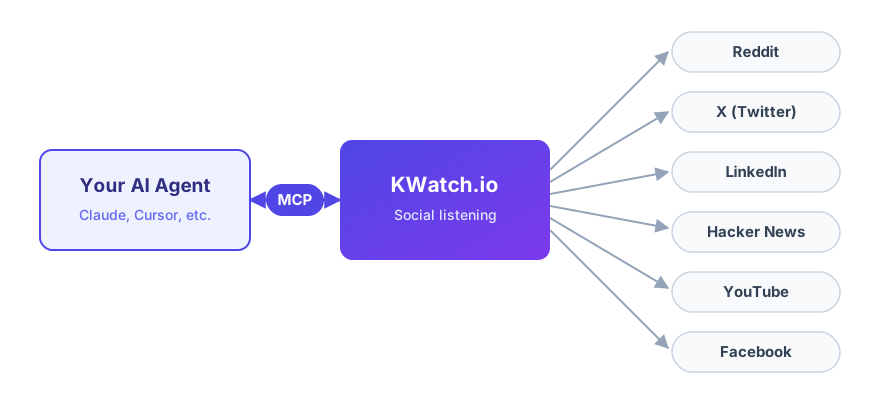
AI agents are becoming full members of marketing, sales, and support teams. With the KWatch.io MCP
server, your agents get first-class access to social listening: they can create keyword alerts, track
conversations, and manage your whole monitoring setup on Reddit, LinkedIn, Hacker News, X, Youtube, and
Facebook, using plain language instructions.
What Is the Model Context Protocol (MCP)?
The Model Context Protocol is an open standard that connects AI assistants and agents to
external tools and data sources. It is often described as the USB-C of AI: instead of writing a custom
integration for every assistant, a platform exposes one MCP server, and every MCP-compatible client can use
it out of the box.
KWatch.io hosts a remote MCP server, so there is nothing to install and nothing to deploy.
Claude, Claude Code, Cursor, VS Code, and any other MCP-compatible client can connect to it in one minute
with a KWatch API key.
What AI Agents Can Do on KWatch.io
Once connected, your agent can use the same capabilities as our REST API, with the same
permissions and team roles:
-
1. Create keyword alerts on Reddit, Hacker News, Linkedin, X, Youtube, or Facebook, with all the
advanced filters: excluded keywords, subreddits, users, languages, whole words, and more.
-
2. List and audit the existing alerts of your team, platform by platform.
-
3. Update or pause alerts with a single instruction, like "pause all my X alerts during the
weekend".
-
4. Start tracking specific Reddit or Hacker News conversations, so you are notified about every new
comment.
The mentions found by KWatch.io are then delivered through your existing notification
channels: email, Slack, and API webhooks. Learn more about our API
webhooks.
Connect Your Agent in One Minute
Our MCP server uses the standard Streamable HTTP transport and is authenticated with your
KWatch API key:
https://api.kwatch.io/mcp
For example, here is how you connect Claude Code to KWatch.io:
claude mcp add --transport http kwatch https://api.kwatch.io/mcp \
    --header "Authorization: Bearer YOUR_API_KEY"
Here is how it works:
-
1. Create an API key in your KWatch.io dashboard, in the API section.
-
2. Add the KWatch MCP server to your AI agent or assistant, with the API key as a bearer token.
-
3. Ask for what you need in plain language: "monitor mentions of my brand on Reddit and Hacker
News, whole words only".
-
4. Your agent sets up and maintains the monitoring, and KWatch.io delivers every new mention to
your email, Slack, or webhooks.
The detailed setup for Claude, Cursor, VS Code, and other clients, along with the full list
of available tools, is in our documentation. Check the MCP server documentation.
Try KWatch.io For Free
 KWatch.io